Wizard ToolZ · Light Spell
Light Spell — Interactive Tattoo Value Study
Interactive value study — see if your color work holds up! Light Spell lets you view black-and-white versions in real time of your tattoo through the live camera, or drop in a reference image and run it through different scales, posterize planes, and value settings until the read is honest.
Light Spell in action
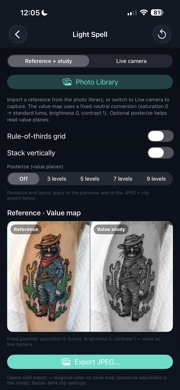
What Light Spell does
Real-time B&W on skin or photos
Metal and Core Image keep a live grayscale pass on skin, fabric, or a flash sheet — or import from Photos and study values beside your reference. Saturation steps aside on purpose: this is about value, not pretty hue.
Layers, planes, and value scales
Brightness, contrast, optional posterize planes for chunky value shapes, and a rule-of-thirds grid when composition matters. Stack panes vertically or side by side and compare how your piece reads at different value settings.
Framed still export
When the read feels honest, export a composite you will actually use in the studio or send to a client.
Motion MP4 — show off or grow
Export a short looping video that transitions from your value study into full color — a portfolio flex when your values are crushing it, or a clear map of where you still have room to grow. Pick aspect, length (about 7–13 seconds), and a motion preset; preview loops before you share.
Seven motion presets
Reveal dissolve plus six on-device Core Image transitions: ink bleed, scanner flash, glitch snap, depth peel, ripple surge, and value plane stack — no cloud, no AI.
When artists reach for Light Spell
- Check whether a color mix reads correctly on skin before you commit ink.
- Run a reference through value planes and see exactly where contrast is soft.
- Export a motion clip for Instagram, client approval, or your own critique reel.
- Zoom before judging tricky pigment mixes — subtleties show up at arm's length.
- Art students: run homework or life-drawing refs through posterize planes for critique.
Frequently asked questions
- Can I use Light Spell on a live tattoo in progress?
- Yes. The live camera path shows real-time black-and-white value on skin. You can also import a photo of healed work or a reference.
- Does Light Spell upload my photos?
- No. All processing stays on your iPhone unless you choose Save or Share through the system.
- What is the best motion preset for social clips?
- Reveal dissolve is the clean default. Epic presets add ink-style motion for portfolio reels — preview loops in the export sheet before you share.